Rationale
A colour language with weight
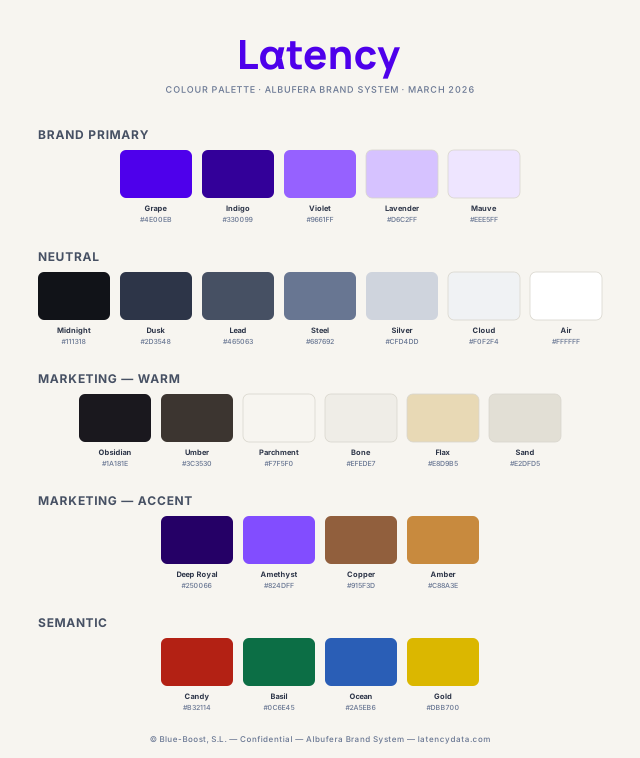
The system is anchored in a high-energy violet (Grape, #4E00EB): a colour that reads as technical authority in the European SaaS context, is categorically distinct from the dominant palettes in the European private markets sector, and carries enough saturation to own every surface it occupies.
"The neutral spine is built from cool blue-greys (Midnight through Air), calibrated for information-dense interfaces where colour competes with data."Colour System Rationale
Colour construction methodology
How the palette is built
Colour systems built by adjusting hex values on the fly produce unintended variation. These seven principles govern every colour decision in the Latency system, from new shade generation to text-on-coloured-background treatment.
Work in HSL
HSL (hue 0°–360°, saturation 0–100%, lightness 0–100%) maps to human colour perception. Two violets with similar hue and saturation are recognisably related in HSL; in hex they are arbitrary strings. Use HSL for all colour reasoning. Note: HSL and HSB are different models.
Saturation flattens at the extremes
In HSL, equal saturation has less visible effect as lightness approaches 0% or 100%. Increase saturation at both ends of any scale to prevent washout. Build scales from the extremes inward: fix the darkest shade (test as text on light) and lightest shade (test as tinted background) first, then fill the middle.
Hue rotation controls brightness
Each hue has an inherent brightness. Yellow, cyan, magenta are brightest; red, green, blue are darkest. To create a lighter shade without losing saturation, rotate toward a bright hue (60°, 180°, 300°). For darker, rotate toward a dark hue (0°, 120°, 240°). Max rotation: 20–30° before the colour reads as a different hue entirely.
Example: Amethyst (#824DFF, ≈292°) is Grape (#4E00EB, ≈248°) rotated 12° toward 300°.
Saturate the neutral scale
Pure grey (0% saturation) looks flat in UI contexts. The Latency neutral scale uses a consistent cool blue-grey temperature to maintain chromatic coherence with Grape. Do not introduce warm or pure-grey neutrals into any Latency context.
Colour never communicates alone
Colour-blind users cannot reliably distinguish certain combinations. Red/green failure affects ~8% of male users. Every colour-coded signal in the system must have a second channel: icon shape, text label, line style, or luminance contrast. Colour reinforces information — it does not replace it.
Gradients stay within 30° of hue
A gradient spanning more than ~30° reads as garish and unintentional. The Latency Gradient (Grape 248° → Deep Royal 262°) spans 14°. The Deep Horizon Gradient collapses toward near-black on the same hue axis. Any new gradient must demonstrate the same constraint.
"Text on coloured backgrounds requires a new colour, not a grey. Grey text that reads clearly on white fails on coloured surfaces — it looks flat and disconnected."Colour construction methodology
On light surfaces
Grey text — passes on white, fails here
Lead — same hue axis, calibrated contrast
Surface: Parchment #F7F5F0
On Deep Royal
White at 40% opacity — looks disabled
Amber — same hue, adjusted: 5.64:1 AA
Air — full white: 15.6:1 AAA
Surface: Deep Royal #250066
Product palette — Socarrat
Primary & secondary colours
The primary colours define every brand-owned surface. Grape is the signature colour. Click any hex code to copy it.
Primary
Neutrals
Semantic colours
Destructive — Error
Constructive — Success
Support — Info / Link
Accent — Warning
Usage ratio — product UI
A directive, not a formula. Individual components will deviate, but the aggregate must hold.
Marketing palette — Albufera extension
Warm neutrals, amber accents, deep purple
Marketing materials operate in a different register; they must convey sophistication, editorial quality, and European premium positioning before a single word is read. The marketing extension introduces three additions to the base system.
Warm neutrals — The foundation
Organic base that reads as high-quality paper rather than screen grey. Replaces Cloud and Silver as the primary background layer in all marketing contexts.
Amber accents — The contrast
Critical constraint
Amber (#C88A3E) achieves only 2.69:1 on Parchment and 2.5:1 on Bone. Both fail WCAG for normal and large text. Amber is never used as a text colour on any light background. On Deep Royal: 5.64:1 — AA pass. Use Obsidian or Copper as the text colour on light backgrounds. Reserve Amber for dark background contexts only.
Deep purple — Refined Grape
Usage ratio: marketing (60-30-10)
Density rule
The warm palette and the marketing tríada are calibrated for low information density. A marketing page with 40 data points on a Parchment background does not look like a premium product. If a section needs data density, shift the background to Deep Royal (#250066) or use an inset with Air (#FFFFFF). The visual contrast between a Parchment section and a Deep Royal section is itself a typographic event.
Grape — 10% rule
Grape (#4E00EB) is reserved for maximum-hierarchy elements only: CTAs, checkmarks, accent borders, links, and primary interactive elements. It is not a decorative colour. Grape in a section background, an illustration fill, or a decorative strip is a hierarchy violation — the moment it exceeds the 10% band, the CTA signal degrades.
No pure white backgrounds
Do not substitute #FFFFFF for page backgrounds in marketing contexts. White reads as product UI or commodity SaaS. Parchment (#F7F5F0) and Bone (#EFEDE7) are the base surfaces — their warm undertone is the mechanism that makes the editorial register work.
Gradient system
Two brand gradients
Synthesis Gradient
Primary brand gradient. Hero and campaign surfaces. 135deg · #4E00EB → #250066
Signal Gradient
Secondary brand gradient. Ambient dark gradient. 135deg · #9661FF → #4E00EB → #250066
Deep Horizon
Marketing — ambient dark gradient. Deep Royal to Obsidian. 135deg · #250066 → #1A181E
Warm Surface
Marketing background. Parchment to Bone. Subtle transition for page sections. 135deg · #F7F5F0 → #EFEDE7
Gradient constraint
Use gradients as backgrounds only when text is 24px or larger, bold, and positioned over the darker portion of the gradient. For body text, use flat Grape or flat Midnight as the background. Gradient behind 14px regular-weight copy is a forbidden treatment.
Permitted decorative gradients
Warm Surface gradient
135deg · #F7F5F0 → #EFEDE7 — Parchment to Bone. Permitted for section transitions and PDF exports. Do not apply over body-weight text.
Amethyst radial glow
Amethyst (#824DFF) at 0.04–0.05 opacity max, corner-positioned on Deep Royal or Obsidian surfaces. Depth technique for dark panels only. Never on light backgrounds.
Closing anchor
Document termination pattern
Long-form marketing materials should not end on body copy. Body copy as a final element reads as unfinished — it leaves the reader without a destination.
The pattern
A full-width callout block using Deep Royal (#250066) as the surface. Message text in Instrument Serif italic, coloured Flax (#E8D9B5) or Air. An optional label in Iosevka Charon, Amber (#C88A3E), uppercase — one of the two legitimate uses of Amber as text on deep surfaces.
The closing anchor is not a footer. It carries the brand claim, a decisive statement, or a CTA. It is the last thing the reader sees.
Live example
Misuse guide
Eight forbidden treatments
Each treatment below describes the wrong output, not an abstract rule. The example is the thing that actually happens, not a hypothetical.
Lemon text on any light background
Do not
A warning label in Lemon (#FFD505) on an Air (#FFFFFF) card surface. The text is bright yellow, technically present, and completely unreadable; it fails WCAG at 1.2:1. Lemon does not have enough luminance difference from white to function as text under any circumstances.
Correct use
Use Gold (#DBB700) for warning-state text on light backgrounds. Reserve Lemon for fills, icons, and badge backgrounds only.
Warning
File size exceeds the 10 MB limit. This action cannot be undone. Please reduce the file size before uploading.
Lemon #FFD505 on Air #FFFFFF — 1.2:1 contrast. The label, the description, and the warning text are all invisible.
Warning
File size exceeds the 10 MB limit. This action cannot be undone. Please reduce the file size before uploading.
Midnight #1A181E on Lemon fill #FFF4BD — 12.8:1 AAA. Lemon is applied as a tinted surface, not as text colour.
Violet as body-copy colour on Air
Do not
A paragraph of 14px Violet (#9661FF) text on an Air (#FFFFFF) background. At 3.0:1 it fails AA for normal-weight body text. Violet is reserved for UI accents, tags, and AI-context elements at non-text scale.
Correct use
Use Midnight (#111318) or Lead (#465063) for all body-weight copy on light surfaces.
The European private markets data infrastructure problem isn't about effort. It's about architecture. Three platforms running in parallel, financial data arriving 18 months late, and the most interesting companies staying effectively invisible — that's not a research failure. It's a process failure. Latency solves this by normalising data directly from national registries.
Violet #9661FF on Air #FFFFFF — 3.0:1 — fails AA for normal text at 14px. Requires 4.5:1 minimum.
The European private markets data infrastructure problem isn't about effort. It's about architecture. Three platforms running in parallel, financial data arriving 18 months late, and the most interesting companies staying effectively invisible — that's not a research failure. It's a process failure. Latency solves this by normalising data directly from national registries.
Midnight #111318 on Air #FFFFFF — 18.58:1 AAA. Violet stays reserved for UI accents and AI-context elements at scale.
Grape background on extended content surfaces
Do not
A full-page Grape (#4E00EB) background behind a long-form content section. Within 30 seconds, the sustained violet saturation creates visual fatigue. Grape is a high-energy colour; it commands attention but cannot hold it at this scale.
Correct use
Limit Grape backgrounds to hero panels, CTAs, and feature highlights of less than 40% page height. Use the Synthesis Gradient (Grape to Deep Royal) for extended dark surfaces.
Latency maps an investor's thesis onto normalised data across +52M European companies and surfaces matches continuously.
The platform ingests registry filings directly — no intermediaries, no aggregator lag. Verified financials for 12M companies across every major European market.
A proprietary taxonomy covers 1,200 micro-markets. The agentic layer runs continuously against the full dataset, not on demand.
Section continues for 3 more screens at full Grape saturation. Visual fatigue sets in within 30 seconds — Grape cannot hold extended surfaces.
Steel text on Cloud in data-dense tables
Do not
A table with Steel (#687692) body copy on Cloud (#F0F2F4) row backgrounds. The ratio is 4.07:1 — AA pass for large text only. In a product displaying 50-row tables of financial data, this fails WCAG AA for normal text and becomes actively unreadable at 14px.
Correct use
Use Midnight for primary data in tables on Cloud rows. Steel is only acceptable for metadata and tertiary labels that serve a subordinate function.
Semantic colours used for brand decoration
Do not
A marketing section using Neon (#16CA7F) as a decorative accent strip because it is energetic and contrasts with Grape. Neon is now ambiguous: in product context it means "success state," in marketing it means "design accent." Users who move between product and marketing learn to distrust the system.
Correct use
Semantic colours (Candy, Neon, Skyline, Lemon) are reserved for status communication only. For decorative accents in marketing, use Violet or the Signal Gradient.
Gradient behind 14px regular-weight copy
Do not
The Synthesis Gradient used as a background behind a paragraph of Air (#FFFFFF) body text at 14px regular weight. If the gradient is applied at 135deg across a wide surface, text positioned over the lighter Violet end of a Signal Gradient fails at 3.85:1 — AA pass for large text only.
Correct use
Use gradients as backgrounds only when text is 24px or larger, bold, and positioned over the darker portion of the gradient. For body text, use flat Grape or flat Midnight as the background.
The European private markets data infrastructure problem isn't about effort. It's about architecture. Three platforms running in parallel, financial data arriving 18 months late, and the most interesting companies staying effectively invisible. That's not a research failure — it's a process failure.
Latency solves this by normalising data directly from national registries across 50 European markets.
Text over the Violet end of Signal Gradient: ~3.85:1 — fails AA for 14px normal text. Text over the Grape/Deep Royal end: passes. A single gradient can produce both a pass and a fail on the same surface.
The European private markets data infrastructure problem isn't about effort. It's about architecture. Three platforms running in parallel, financial data arriving 18 months late, and the most interesting companies staying effectively invisible. That's not a research failure — it's a process failure.
Latency solves this by normalising data directly from national registries across 50 European markets.
Midnight #111318 flat background — Air text at 19.97:1 AAA across the entire surface. No contrast failures anywhere on the panel.
Grey or opacity-reduced text on coloured surfaces
Do not
Supporting text on a Grape or Deep Royal card uses Lead (#465063) at 80% opacity, or white at 50% opacity. On a white background, grey text works by reducing luminance contrast. On a coloured surface, the same grey reads flat and disconnected — it has no relationship to the background hue. White at reduced opacity looks disabled and bleeds through any texture or gradient.
Correct use
Pick a new text colour sharing the background's hue — adjust saturation and lightness until the contrast ratio meets WCAG AA. The Amber-on-Deep-Royal pairing (5.64:1 AA) is the documented example of this technique applied correctly. Air at full opacity remains always available for primary text on dark surfaces.
Platform overview — Latency
Platform overview — Latency
Platform overview — Latency
None of these three combinations meet WCAG AA on Grape. Grey has no hue relationship with the surface. Opacity-reduced white looks disabled and bleeds on any texture.
Platform overview — Latency
Air #FFFFFF on Grape #4E00EB — 8.32:1 AAA. Full-opacity white, no opacity reduction.
Platform overview — Latency
Amber #C88A3E on Deep Royal #250066 — 5.64:1 AA. Hue-related secondary colour, not neutral grey.
Colour as the sole signal for status or data encoding
Do not
A table of company performance uses Neon (#16CA7F) for positive growth and Candy (#B32114) for negative growth, with no accompanying icon, label, or contrast difference. Red-green colour blindness affects approximately 8% of male users — for them the table communicates nothing about direction.
Correct use
Always pair colour with a second communication channel. For trend data: an upward/downward arrow icon alongside the colour. For status states: a text label or icon shape that is distinct independently of colour. The colour reinforces the signal; the second channel carries it for users who can't see the colour distinction.
Design tokens
W3C token format
Complete colour token JSON. Primitive layer: one entry per named swatch. Semantic layer: references primitives using CSS variable syntax. Kebab-case throughout.
{
  "color": {
    "primitive": {
      "grape":    { "$value": "#4e00eb", "$type": "color" },
      "indigo":   { "$value": "#330099", "$type": "color" },
      "violet":   { "$value": "#9661ff", "$type": "color" },
      "lavender": { "$value": "#d6c2ff", "$type": "color" },
      "mauve":    { "$value": "#eee5ff", "$type": "color" },
      "midnight": { "$value": "#111318", "$type": "color" },
      "lead":     { "$value": "#465063", "$type": "color" },
      "steel":    { "$value": "#687692", "$type": "color" },
      "silver":   { "$value": "#cfd4dd", "$type": "color" },
      "cloud":    { "$value": "#f0f2f4", "$type": "color" },
      "air":      { "$value": "#ffffff", "$type": "color" },
      "mkt-obsidian":  { "$value": "#1a181e", "$type": "color" },
      "mkt-parchment": { "$value": "#f7f5f0", "$type": "color" },
      "mkt-bone":      { "$value": "#efede7", "$type": "color" },
      "mkt-amber":     { "$value": "#c88a3e", "$type": "color" },
      "mkt-copper":    { "$value": "#915f3d", "$type": "color" },
      "mkt-deep-royal":{ "$value": "#250066", "$type": "color" },
      "mkt-amethyst":  { "$value": "#824dff", "$type": "color" }
    },
    "semantic": {
      "interactive": {
        "default":  { "$value": "{color.primitive.grape}"    },
        "hovered":  { "$value": "{color.primitive.indigo}"   },
        "pressed":  { "$value": "{color.primitive.indigo}"   },
        "disabled": { "$value": "{color.primitive.lavender}" }
      },
      "text": {
        "primary":   { "$value": "{color.primitive.midnight}" },
        "secondary": { "$value": "{color.primitive.lead}"     },
        "tertiary":  { "$value": "{color.primitive.steel}"    },
        "inverse":   { "$value": "{color.primitive.air}"      }
      },
      "mkt": {
        "bg-base":    { "$value": "{color.primitive.mkt-parchment}" },
        "bg-surface": { "$value": "{color.primitive.mkt-bone}"      },
        "bg-deep":    { "$value": "{color.primitive.mkt-deep-royal}" },
        "text-primary": { "$value": "{color.primitive.mkt-obsidian}" },
        "cta":          { "$value": "{color.primitive.grape}"        }
      }
    }
  }
}